WooCommerce Employee Management with Shop Manager
WooCommerce employee management gives your staff a place to work that is not the WordPress admin. You add someone, pick a role, and they get a login that opens straight into the Shop Manager dashboard with only the sections their role allows. The module, the four built-in roles and the activity log are all free; building roles of your own needs Pro.
What It Changes for Your Team
- Employees work inside
/sm-dashboard/and nowhere else. - If one of them opens a wp-admin URL, they are sent back to the dashboard. The WordPress admin bar is hidden for them on the front end too, so there is no link back in.
- Each role carries its own set of permissions, down to individual actions like changing an order status or deleting a product.
- What they do is recorded, so you can see who changed what.
None of this applies to ordinary WordPress roles. An administrator or shop manager keeps full wp-admin access as usual, so WooCommerce employee management only takes hold once someone is given a Shop Manager role.
Turning the Module On
WooCommerce employee management is on by default. If you need to check, go to Shop Manager in the WordPress sidebar, open Modules, and look at the Employee Management card. Switch it on if it is off, then use Configure to jump to its settings. The Configure button only appears while the module is enabled.
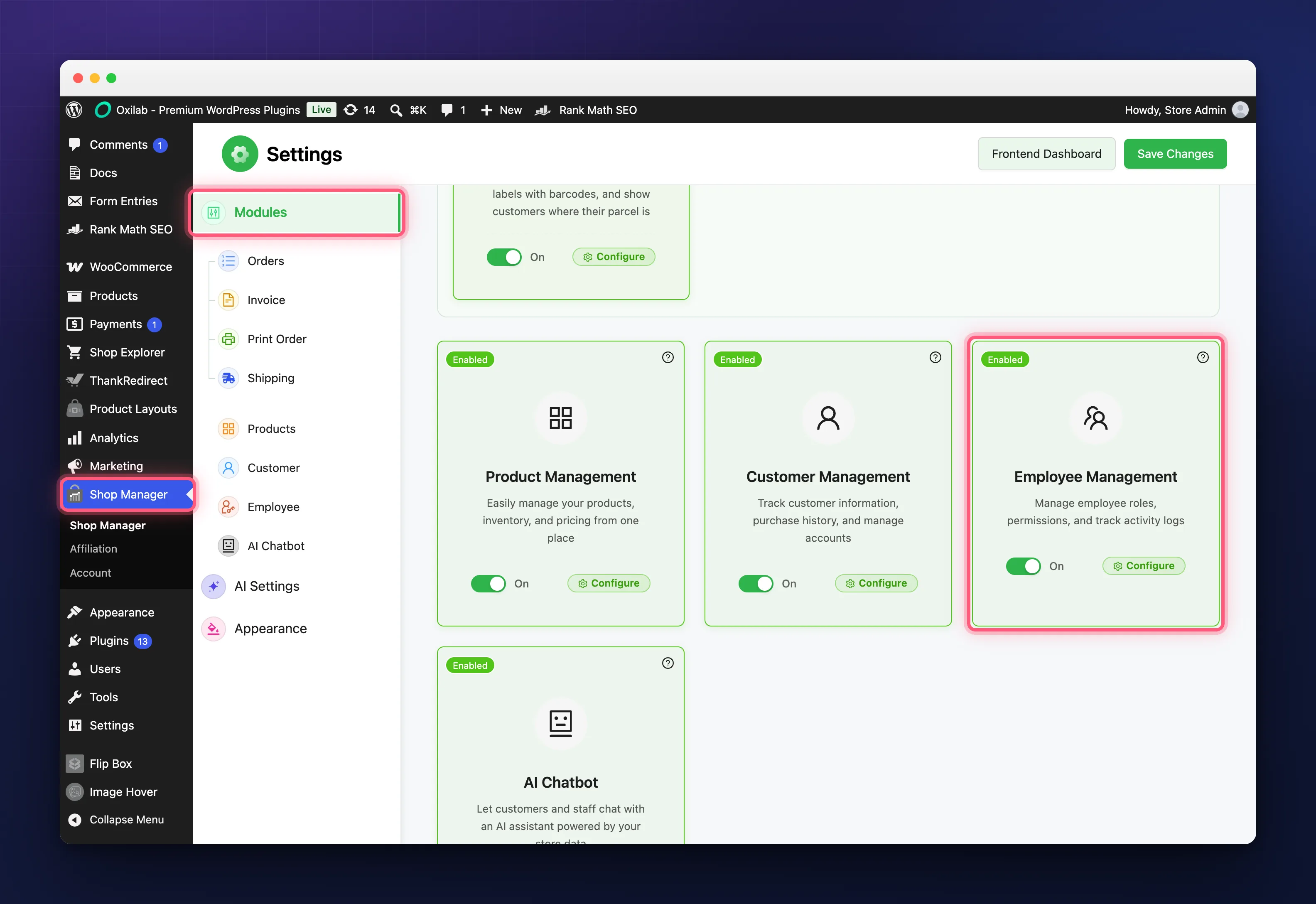
With the module off, Employees disappears from the dashboard sidebar and nobody can be added or edited.
The Employees List
Everything in WooCommerce employee management starts from one screen. In the dashboard sidebar, open Employees, then All Employees.
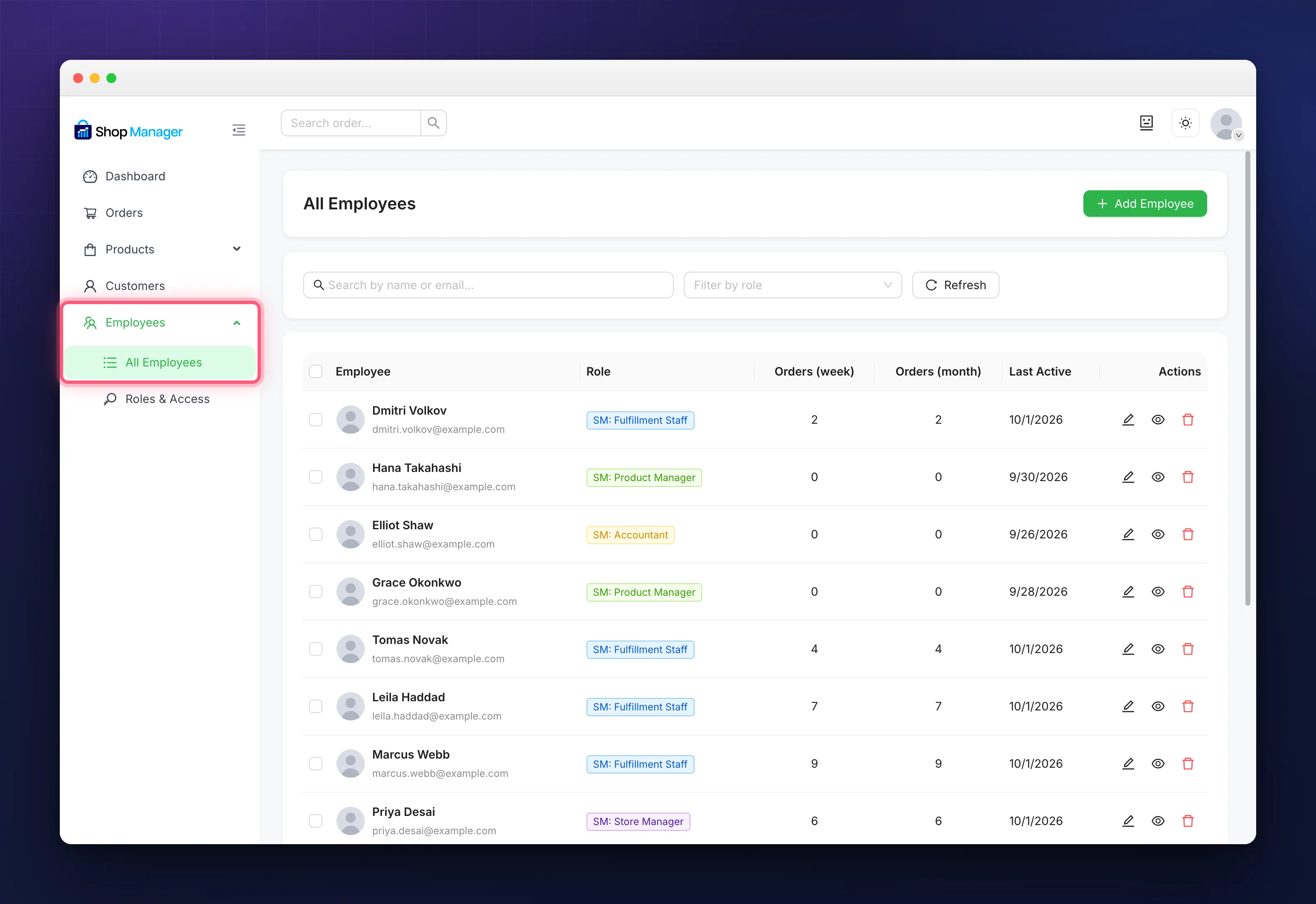
Each row gives you the person with their email, their role as a coloured badge, how many orders they have processed in the last week and the last month, the date they were last active, and buttons to edit them, open their profile or delete them. Clicking the name opens the profile as well.
Above the table you can search by name or email and filter by role. Ticking several people lets you change their role in bulk or delete them together.
Delete removes the WordPress user account. It is not a way to suspend someone. If you only want to take access away, change their role instead. The button refuses to touch any account that is not a Shop Manager employee, so you cannot delete an administrator by accident.
The Four Built-in Roles
- SM: Fulfillment Staff: orders, including tracking and labels.
- SM: Product Manager: products.
- SM: Accountant: the dashboard and analytics.
- SM: Store Manager: orders, products, analytics, and customers to look at but not to edit.
Every one of these can be adjusted, and none of them can do anything you have not allowed. For the exact permission behind each tick box, see Role Based Access Control.
Troubleshooting
There is no Employees item in the dashboard sidebar.
Either the Employee Management module is off, or your own role does not include Employees access.
An employee can still reach wp-admin.
Check which role they actually hold. The redirect only applies to Shop Manager roles, so someone left as an Editor or Shop Manager keeps their usual access.
The Add Employee button is missing.
That button needs the create employees permission. An administrator can grant it on the Roles and Access screen.
A new employee never got their email.
The dashboard always sends it when you add someone, so there is no setting to check. Open their profile and use Reset Password to send a fresh link, which is good for 24 hours. If that does not arrive either, mail is failing site wide and that is a WordPress problem rather than a Shop Manager one.
A role badge has a padlock on it.
That is a custom role on a site without a Pro licence. It stays in the list but grants nothing until Pro is active.
Related Documentation
- Add Employees & Assign Roles: the full flow for onboarding someone.
- Role Based Access Control for Your Store: every permission, and how to change them.
- Create Custom Employee Roles: build your own role, with Pro.
- Employee Activity Log & Performance Reports: what gets recorded, and the per-person numbers.