


 Product Layouts
 ThankRedirect
 Image Hover
 Flipbox
How to win back abandoned carts in WooCommerce
The short answer
Shop Manager Pro saves the cart when a shopper types an email or phone number at checkout and then leaves. After 30 minutes with no activity it counts as abandoned. Three reminder emails go out 1, 24 and 72 hours after the shopper left. The last email has a 10% coupon made just for them. You can change the words, the timing and the discount, and send up to five emails.
Amina's story
Sells towels and bed sheets online. Amina is a made-up example.
Amina sells cotton towels and bed sheets online. Orders come in every day, so she thinks the shop is doing fine.
Then at dinner her cousin says: "I tried to buy from your shop last week. I filled the cart and typed my email. Then my bus came, and I forgot."
Amina checks her orders. Nothing. No name, no cart, no sign that anyone was there.
Now she can't stop wondering. How many people did that last week? Ten? Fifty? WooCommerce shows her the orders she got. It does not show the people who left before ordering.
Sound familiar?
- People reach your checkout, but fewer orders come in than you expect.
- You have no idea who left or what they wanted to buy.
- You want to remind people before you give anyone a discount.
Here is how to do it
-
Turn it on
Install Shop Manager Pro next to the free plugin. In the Shop Manager settings, click Modules and check that Abandoned Cart Recovery is on. If you had to turn it on, click Save Changes. Nothing else is needed to start, because the emails are already written.
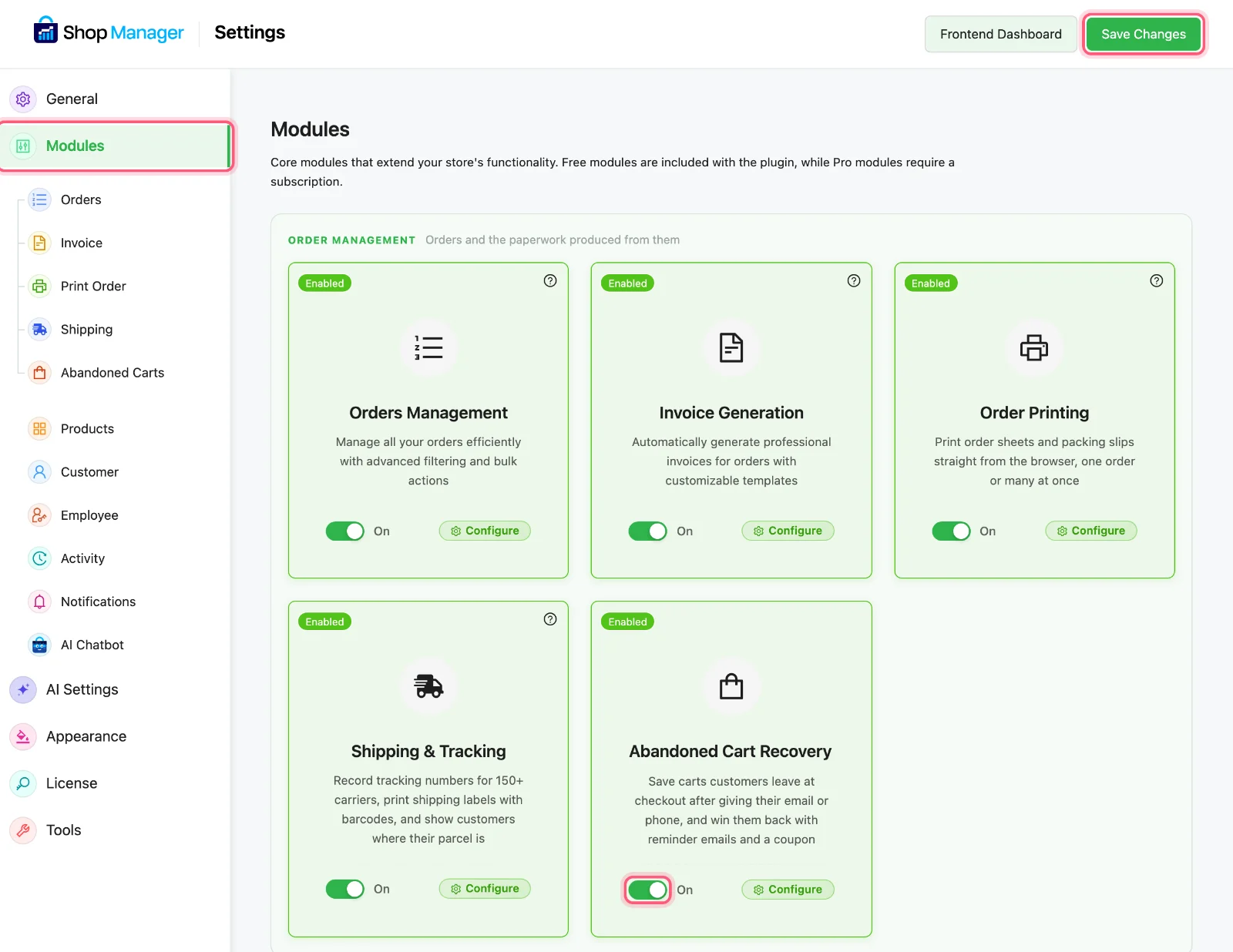
Click Modules, check the switch, and click Save Changes if you changed it. All three are marked. -
Read the three emails
The first email goes 1 hour after the shopper leaves, the second at 24 hours and the third at 72 hours. The first two are plain reminders. Only the third has a coupon, so people do not learn to leave a cart just to get a discount. You can change the words and the timing, and use from one to five emails.
Amina keeps the timing and changes the coupon to 5%.
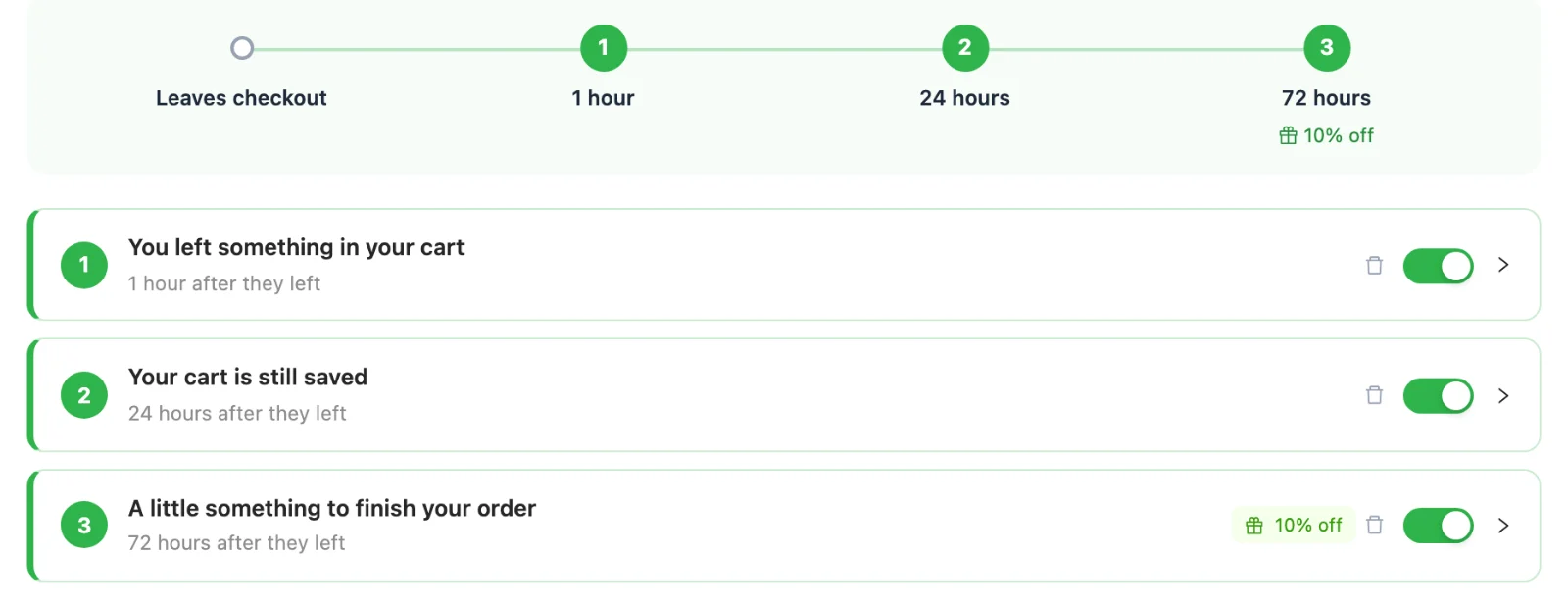
The ready-made emails, with the 10% coupon on the third. -
What the shopper sees
At checkout, a short notice under the email field tells the shopper you save their email and cart to remind them, with a No thanks button. If they leave, the emails start. The button in the email fills the cart again and opens checkout. Each shopper gets their own coupon code, for one use. Every email has a link to stop the reminders. Once they order, the reminders stop.
An hour after the bus, Amina's cousin would get the first email. One tap, and the cart is back.
-
See the money waiting
Click Abandoned Carts in your dashboard menu. You see how much money is sitting in open carts, your recovery rate, and how many carts you won back, still have open or lost. A weekly report by email is on by default. It goes out in weeks when carts were left or won back.
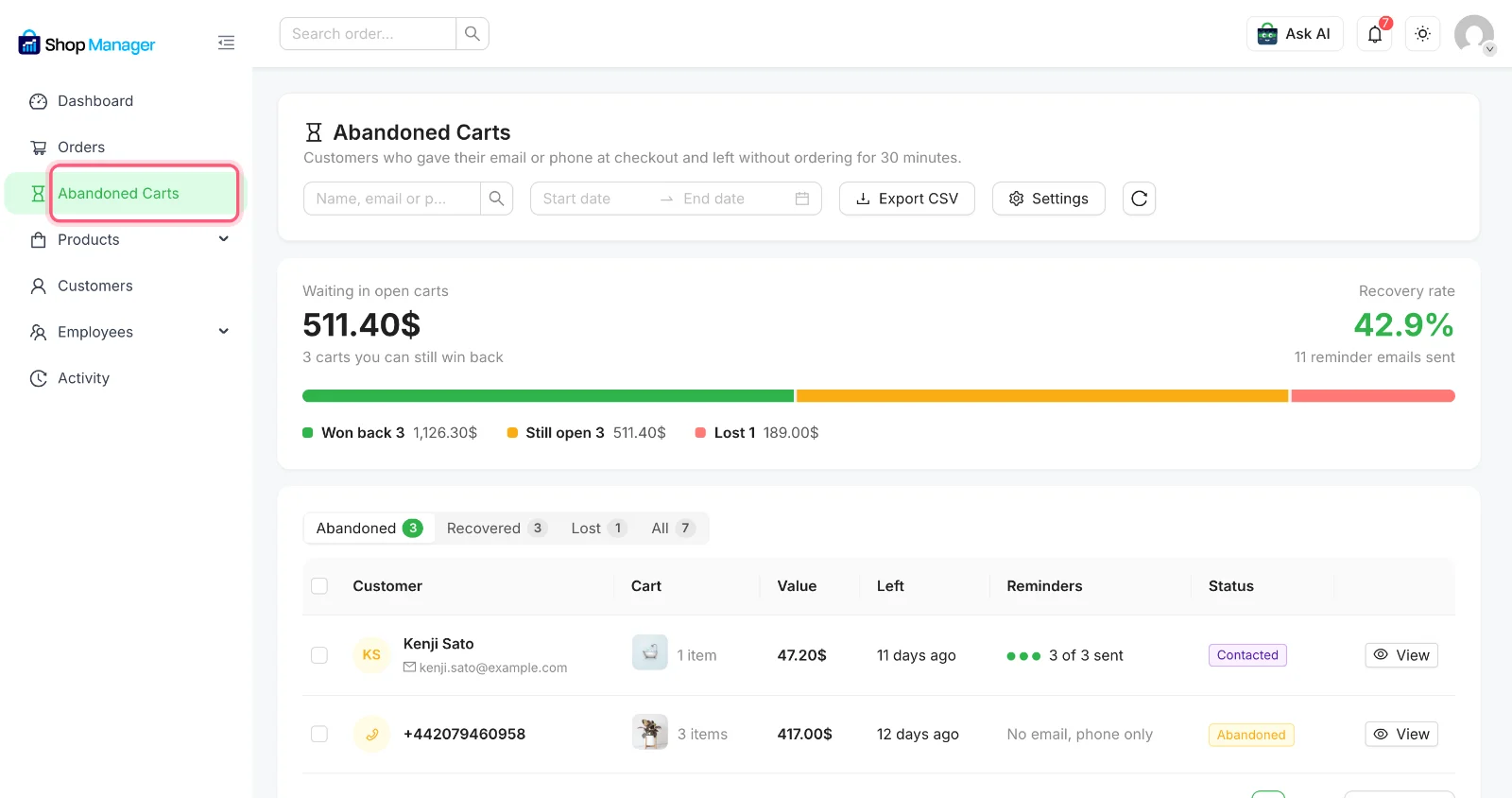
Click the marked menu item. Sample numbers from our test store, not a real result. -
Contact the big carts yourself
Click View on a cart to see who left it and what was in it. If they gave a phone number, you get buttons to call, send a WhatsApp message or send a text. If they gave an email, you get an email button. You can also copy their link or create the order for them. Shoppers who leave only a phone number get no reminder emails, so this is how you reach them.
Amina sees a big cart with only a phone number. She taps WhatsApp, and the message is already written. She just presses send.
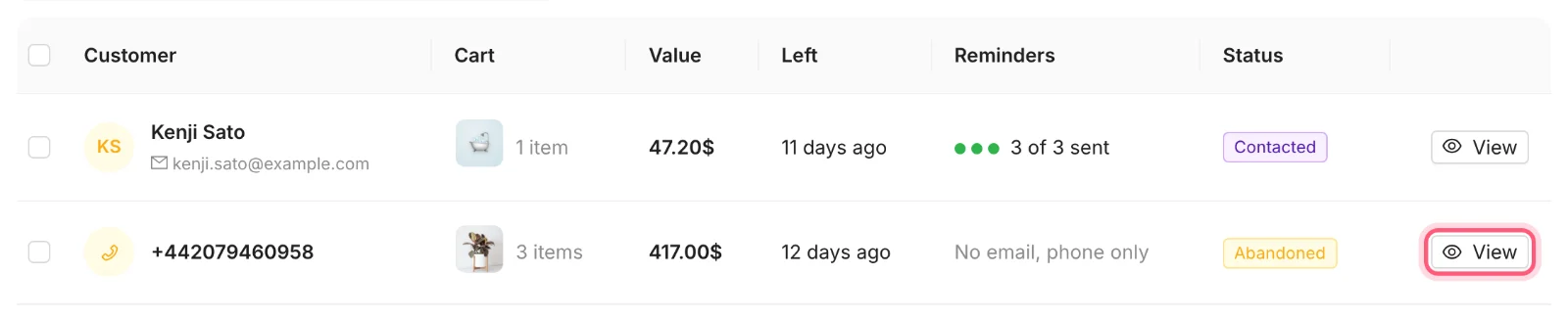
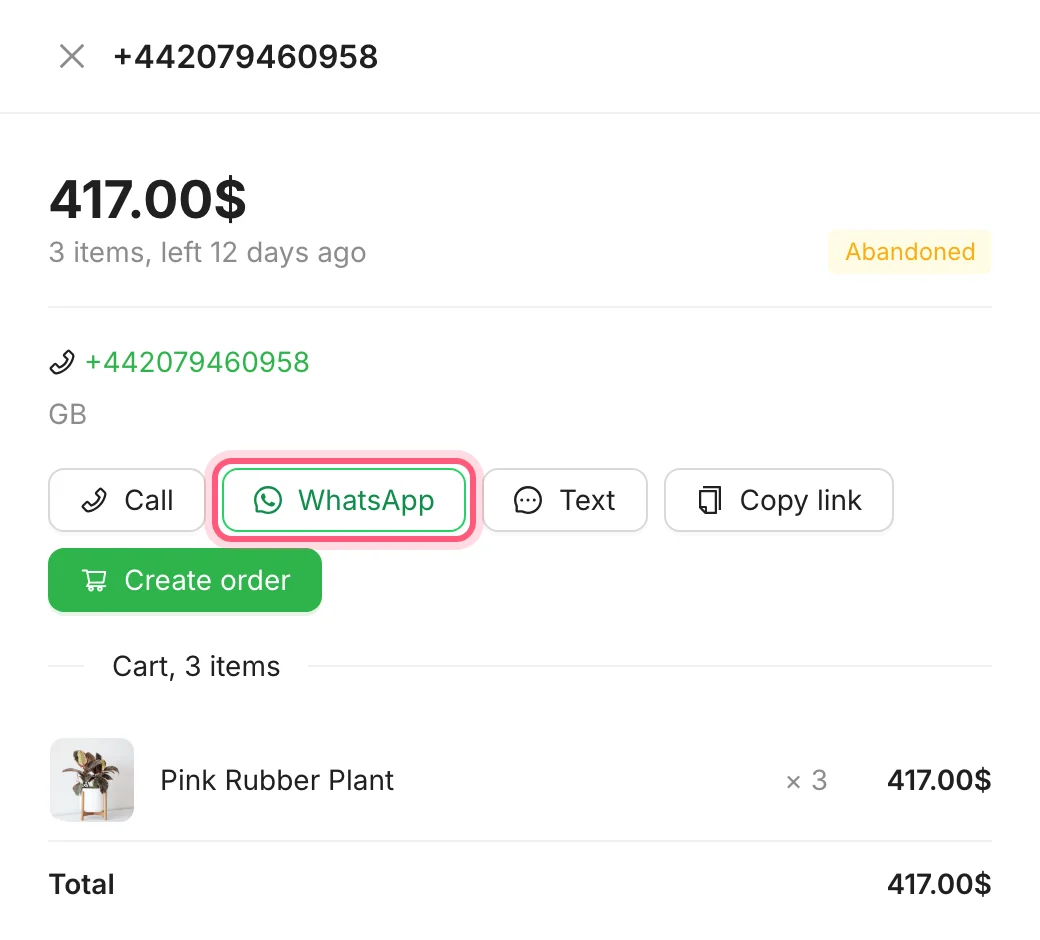
First click View. Then click a contact button. WhatsApp is marked. This cart, from our test store, has only a phone number.
Do the sum for your own store
Here is how to work out what abandoned carts could mean for you. These numbers are made up to show the sum.
| Example | Number |
|---|---|
| Carts left in a week | 10 |
| Average cart | $40 |
| Money left behind each week | $400 |
| If 1 in 10 shoppers comes back | $40 a week, about $160 a month |
Your numbers will be different. The Abandoned Carts page shows the real ones for your store.
How Amina's story ends
A week later Amina opens the Abandoned Carts page. There are names on it now, and carts, and a figure for the money still waiting. Some shoppers will come back after the first email. Some will wait for the coupon. Some never will, and that is fine. The difference is that she can see them now.
Find out who is leaving your checkout
Abandoned cart recovery comes with every Shop Manager Pro plan, with a 14-day money-back guarantee.
What you need
- Plan
- Any Pro plan
- Free plugin
- Needed too, Pro runs with it
- Emails
- 1 to 5, three are ready to use
- Coupons
- Made for you, one use each
- Privacy
- Checkout notice and No thanks button
Features used on this page
- See the carts people left behind
- Reminder emails and a one-time coupon
- Contact the big carts yourself
Checked against the plugin in .
Questions people ask
Do I need Shop Manager Pro for abandoned carts?
Yes. Abandoned cart recovery is part of every Shop Manager Pro plan, and Pro runs together with the free plugin.
When does a cart count as abandoned?
After 30 minutes with no activity. You can change this to anything from 10 minutes to 24 hours. A cart is saved once the shopper types an email or phone number at checkout. For a logged in shopper, it is saved when they open checkout.
Will it email someone who already bought?
No. When an order with the same billing email reaches Processing, Completed or On hold, the cart closes and the reminders stop. An unpaid order does not count, so reminders can continue until it is paid. You can change which statuses count.
What if the shopper only gave a phone number?
They get no emails. The cart still shows on the Abandoned Carts page with buttons to call, send a WhatsApp message or send a text. You press send yourself, nothing goes out automatically on those channels.
Do I have to make the coupons myself?
No. A code is made when the email that carries it is sent. It works once, only for that shopper's email address, and ends after 2 days unless you change that. The button in the email can add it to the cart for them.
Can shoppers say no?
Yes. The checkout notice has a No thanks button, and every email has a link to stop the reminders. The rules on these emails differ by country, so check what applies to your store.
Can I use this with another abandoned cart plugin?
Use only one at a time. With two, a shopper would get two sets of emails and coupons. Shop Manager shows a warning if it detects another one.
More stories
- Some of your best customers stopped buying months ago. Nothing told you. Find your best customers and the quiet ones Free
- Every morning you click through five screens to find out if anything went wrong. Check your store each morning Free
- It is the first of the month. Your accountant wants last month's invoices, and you have not started. Send invoices to your accountant Needs Pro