

Skip to content
Up to80%off Black Friday & Cyber Monday Up to 80% off Oxilab plugins. Ends December 1.
00Days 00Hours 00Mins 00Secs
Get the deal
  • For WooCommerce stores

    Shop Manager NewRun orders, shipping and staff from the front of your site Product LayoutsProduct grids, tables, sliders and quick view ThankRedirectCustom thank you pages that bring buyers back

    For WordPress design

    Image Hover Effects Popular500+ hover animations, lightbox and galleries Flipbox3D flip boxes and image overlays for teams and lists
    Every plugin is free to start on WordPress.org.See all on WordPress.org
  • Offers Hot
  • Documentation155 setup guides for every plugin BlogReleases, tutorials and tips Video tutorialsWatch each plugin set up step by step AffiliatesEarn up to 30% on every sale you refer
  • Support
Customer area

For WooCommerce stores

Shop Manager NewRun your store from the front end Product LayoutsGrids, tables, sliders ThankRedirectCustom thank you pages

For WordPress design

Image Hover Effects500+ hover animations Flipbox3D flip boxes and overlays
Offers Support DocumentationBlog Video tutorialsAffiliates
Customer area
Product LayoutsDocumentation

  • What is Product Layouts for Woocommerce Plugin?
  • How to Install and Activate Product Layouts for Woocommerce FREE Version?
  • How to Create Product Carousel?
  • How to create category tabs?
  • How to Set Filter & Sorting ?
  • How to Create General Layouts
  • How to create Call to action Layouts?
  • How To Create Table Layouts?
  • How To Create Product List Layouts?
  • How to create Caption Layouts?
  • How to create Flip box Layouts?
  • How to Customize Product Layouts.
  • How to set Pagination?
  • How to set load more button?
  • How to Design Category Archive Page.
  • How to export and import Layouts?
Docs Product Layouts Create Layouts

How To Create Product List Layouts?

1 min read Updated Sep 23, 2024

 
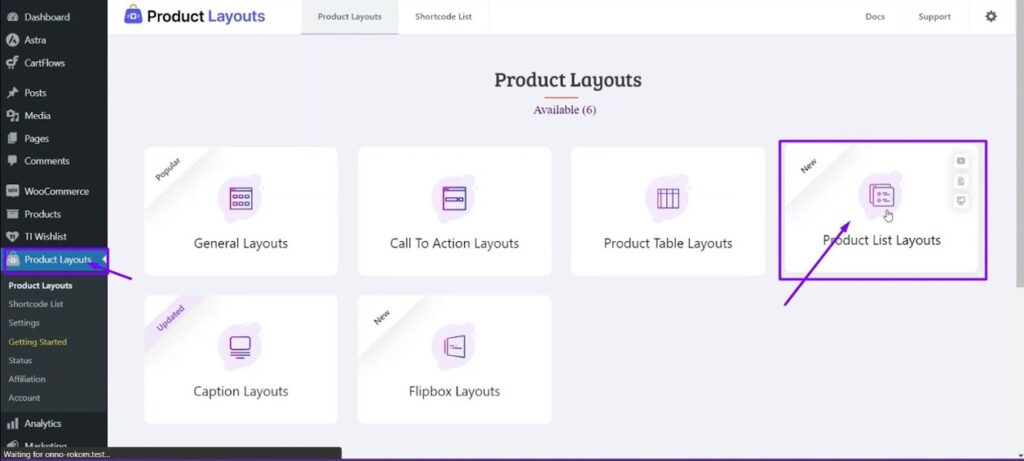
ste1: Go to Dashboard> Product Layouts > Product List Layouts.
 
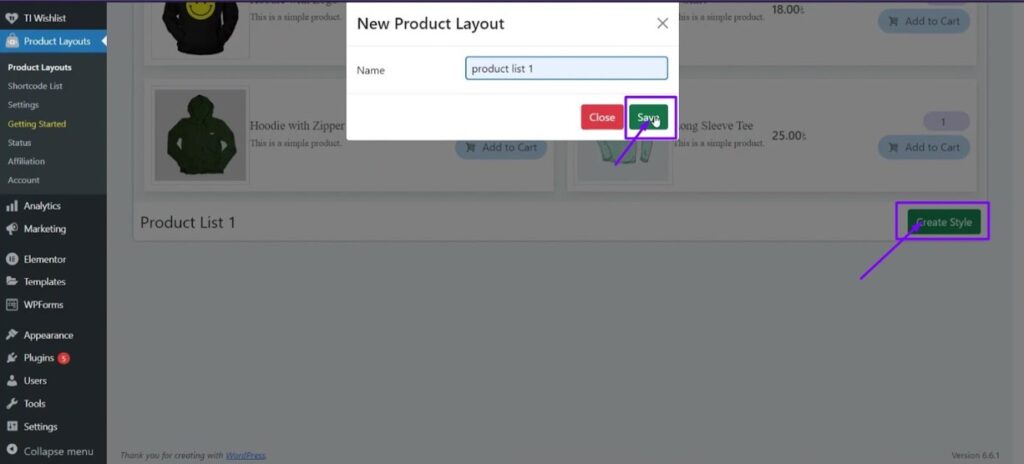
Step2: Create Style > set a name > save.
 
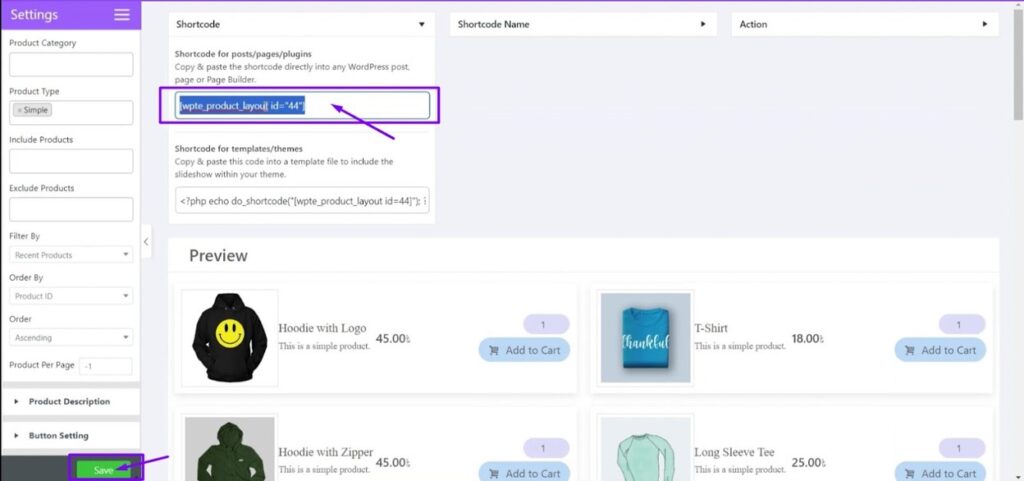
Step3: Save design > “Use the shortcode anywhere to display the Layouts.”
Previous guideHow To Create Table Layouts? Next guideHow to create Caption Layouts?
Still stuck?

A developer who works on Product Layouts answers every ticket.

Open a ticket

On this page

    Back to top

    WordPress and WooCommerce plugins for running stores, showing products and making images move. Built and supported by the same small team.

    Plugins

    • Shop Manager
    • Image Hover Effects
    • Flipbox
    • Product Layouts
    • ThankRedirect

    Help

    • Documentation
    • Support
    • Video tutorials
    • Blog
    • Customer area

    Company

    • About us
    • Offers
    • Affiliates
    • Affiliate policy
    • Contact

    Legal

    • Privacy policy
    • Refund policy
    • Terms of service

    Stay in the loop

    One short email when a plugin ships something new. No spam, unsubscribe anytime.

    © 2026 Oxilab. All rights reserved. Secure checkout and licensing by Freemius